
CI/CD Connect
A failed pipelineneeds a plan.
Connect your CI to Allure TestOps and bring results from different test frameworks into one report. Investigate failures and see what changed between test runs. Use previous triage decisions to see what still needs attention.
No credit card required
Problem
The pipeline failed. What happened?
A failed pipeline leaves you to decide what deserves attention next. A list of failed tests is a starting point, but it does not give you enough context to make that decision.
Scattered evidence
Error details, attachments, and related issues sit in separate files and tools.
Missing decision history
The test failed before, but the result does not show what was decided during the earlier investigation.
Different environments
The same test has results in several environments, each recorded in a separate report.
Partial picture
Results from parallel pipeline jobs and manual tests need to be brought together for review.
CI/CD integrations
Quick start. Continuous value.
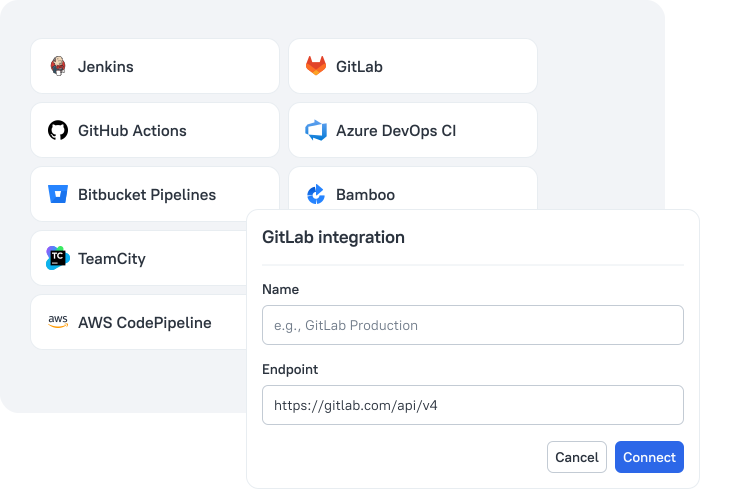
Connecting a test management tool to CI sounds like changing your test code and configuration. Allure TestOps provides built-in CI integrations that require minimal changes to your pipeline configuration. You can start investigating failures before the pipeline finishes, with links back to the source CI executions.
- 1
gradle clean testKeep your setup
Your test command and runners are already configured in your CI pipeline.
- 2
allurectl watch -- gradle clean testAdd the wrapper
Your pipeline uses allurectl to upload results while your tests run.
- 3#92107 Test Run435573
Open test run
Start investigating failures before the pipeline finishes.
Framework integrations
Different frameworks. One actionable report.
Vitest for Frontend tests, Playwright for E2E tests, pytest for API tests. Each framework has its own result format. Allure TestOps brings them together in one report with a consistent structure. You can follow the same process to investigate failures and decide what to do next.

- GitHub stars
- 5.5k+GitHub stars
- Downloads
- 10M+Downloads
- Contributors
- 100+Contributors
- First commit
- 2013First commit
Built on years of open-source work
Our team maintains the framework integrations alongside a community of contributors.
These same integrations connect your automated tests to Allure TestOps.
Failure investigation
A failed test deserves a closer look.
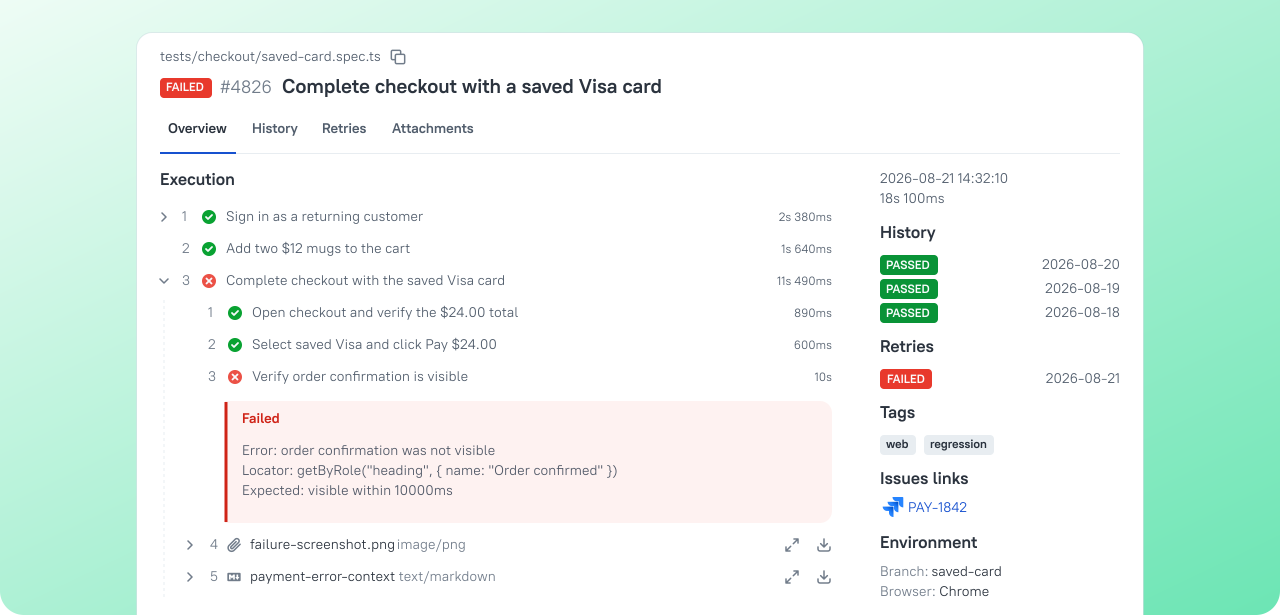
A test fails, but the error alone does not explain why. Allure TestOps shows a detailed execution scenario with the stack trace and attachments. You can follow the sequence of steps that led to the failure and understand what went wrong. The same view shows the test’s history, linked issues, execution environment, and test owners.
Failure triage
Repeated failures. Reusable findings.
You find yourself investigating the same failures again. Allure TestOps keeps your triage decisions with the test results and helps you recognize recurring problems. You can see what still needs investigation without starting over on known failures.
Detect flakiness
Automatically identify and mark tests with inconsistent results across executions.
Mute tests
Keep broken tests running without affecting the overall test run status.
Rerun failures
Rerun selected failed tests to check whether the failure happens again.
Create defects
Automatically group failures under one defect using an error pattern.
Test Run Compare
Same status. Different stories.
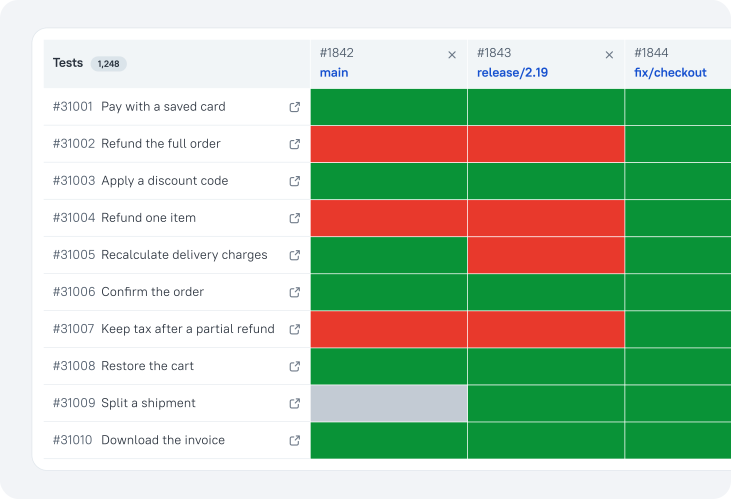
The same test can fail in two runs with different errors. Allure TestOps compares your current run with a baseline, showing statuses, steps, and errors side by side. You can decide which failures need a fresh investigation, even when their status has not changed.
Execution timeline
Small details. Bigger patterns.
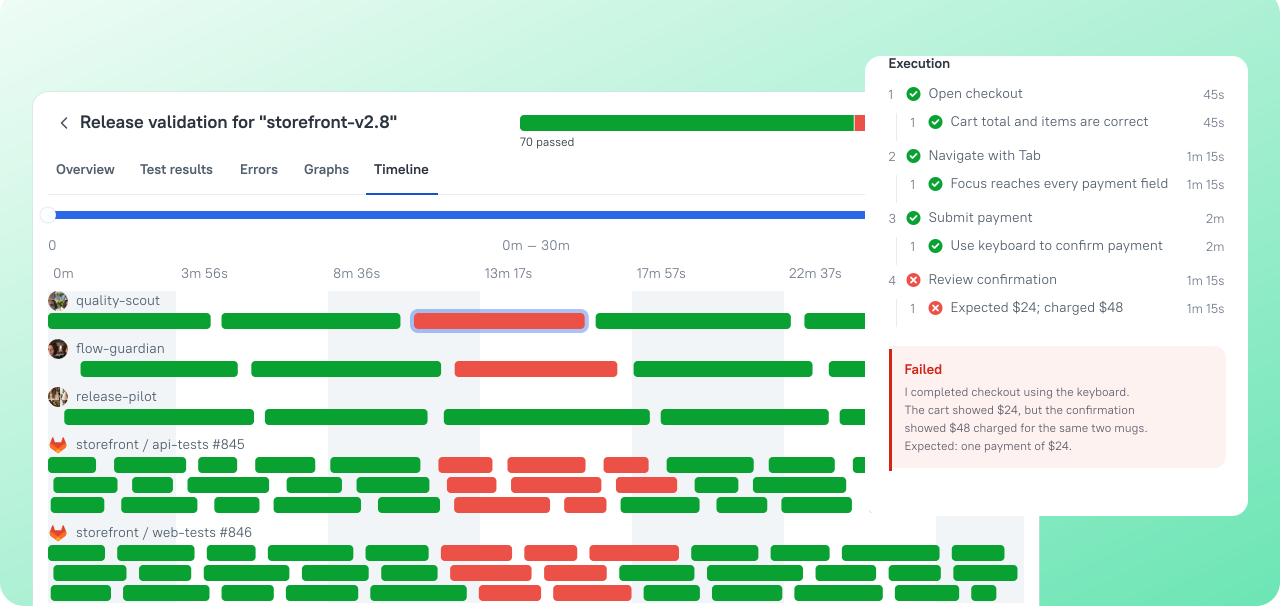
Your tests run across several pipeline jobs. Allure TestOps brings their executions onto one timeline, making patterns visible across the whole test run. Clusters of failed tests help you check for a shared environment problem. Gaps and unusually long tests show where to look for opportunities to reduce execution time. Manual tests appear on the same timeline too.
Try it with your pipeline
Connect Allure TestOps to your pipeline with minimal changes. Turn the next failed run into a plan for what to investigate, rerun, or fix.
No credit card required